Topology Comparator
Screens eight motor topologies against your rating, with weights and scores you can edit, and shows whether the winner survives other weightings.
With the course and the book
Working tools from the Motoreka EV Traction Motor course, free in your browser. No sign-in, nothing to install.
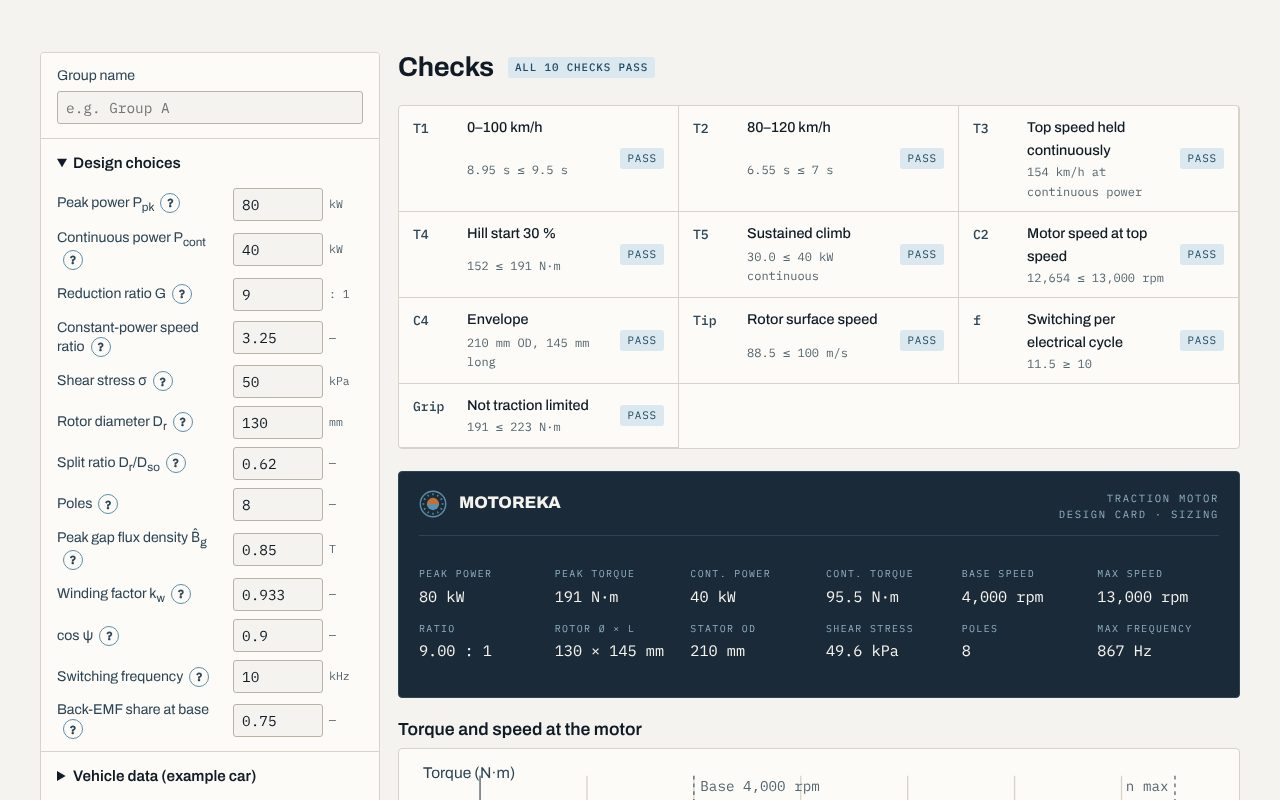
Enter the vehicle, the targets and your design choices. The calculator simulates the full-throttle run, finds the torque, speed and power, sizes the rotor and stator, and checks every target as you type. Help on every box and a 20-second walkthrough show how to use it.
The rest of the method uses five more tools. Each opens the design card the Sizing Calculator saves. They come with the course, and with the book. Click a screenshot to enlarge it.
Screens eight motor topologies against your rating, with weights and scores you can edit, and shows whether the winner survives other weightings.
Picks the electrical steel, magnet grade and winding, shows the losses and temperature margins, and estimates the material cost.
What the motor asks of the inverter and the cooling: current, fault behaviour, losses, hot spots, noise and rotor stress.
A Windows app that builds one pole of your motor in FEMM and reads its flux linkage, torque, voltage limit and ripple.
Opens up to four design cards side by side against the targets and a reference design, for the design review.
Tell us what you teach, build or need designed. We reply within one working day.